Gradle
This binding uses Gradle as its build tool and you will need version 6.0 or higher installed. The next requirement is to have a Godot project (obviously!), if you don't have it yet please create one.
Open a terminal and cd to root directory of your Godot project.
Wrapper
On this step, we will be setting up a Gradle wrapper. The wrapper will ensure that anyone who wants to build your project from source will use the same gradle version.
1 | touch build.gradle.kts gradle.properties settings.gradle.kts |
The above command will create three files, which will be empty for now.
1 | gradle wrapper --gradle-version=6.1.1 |
That is it, you have the wrapper installed! The command will produce several files but the important ones are gradlew and gradlew.bat. Moving forward we will be using gradlew to run gradle (gradlew.bat on Windows). The first time gradlew is used it will download the gradle version you have specified before.
Plugin
Once you have the wrapper installed, we need to setup the Gradle plugin this binding provides. Without the plugin, you will have to manually generate the entry point, .gdnlib and .gdns files.
1 2 3 4 5 6 7 8 9 10 11 12 13 14 15 | plugins { kotlin("multiplatform") version "$kotlinVersion" id("com.github.raniejade.godot-kotlin") version "$godotKotlinVersion" } repositories { jcenter() mavenCentral() } godot { libraries { val simple by creating {} } } |
In the above example, you are telling the plugin to create a library (that can be used in godot) with a name simple. The source directory of the library is at src/<library_name>Main/kotlin.
Up next, let's create a file src/simpleMain/kotlin/Simple.kt with the following contents.
1 2 3 4 5 6 7 8 9 10 11 12 13 14 15 16 | import godot.* import godot.core.* class Simple: Spatial() { override fun _ready() { gprint("Hello Godot from Kotlin!") } companion object: GodotClass<Spatial, Simple>(::Simple) { override fun init(registry: ClassMemberRegistry<Simple>) { with(registry) { registerMethod(Simple::_ready) } } } } |
There's a lot to process here, but let us forget about it for now. Everything will be explained in the classes section of user guide.
We need to tell the plugin that we want expose Simple to godot, which can be done by doing the following.
1 2 3 4 5 6 7 | godot { libraries { val simple by creating { classes("Simple") } } } |
The plugin automatically generates the appropriate gdnlib and gdns files which can be found at src/godot/gdnlib and src/godot/gdns, respectively. It is up to you whether you want to include those files in source control or not.
Now we can trigger a build.
1 | ./gradlew build |
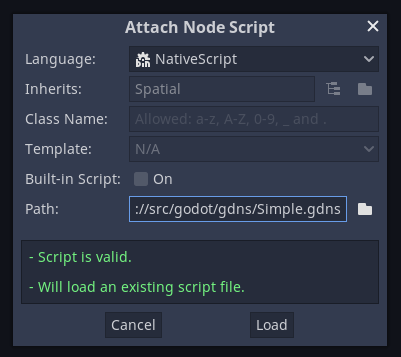
Once the build is done, two files will be generated: src/godot/gdns/Simple.gdns and src/godot/gdnlib/Simple.gdnlib. You can use Simple.gdns in Godot when assigning a script to a node.
Configuring target platforms
By default the plugin is configured to build all supported platforms. This can be changed via the platforms property of the library.
1 2 3 4 5 6 7 8 | godot { libraries { val simple by creating { platforms(TargetPlatform.WINDOWS) ... } } } |